Install with Docker
Three images, one for each thing that runs: the CLI on the CPU, the CLI on a
GPU, and the viewer. compose.yaml at the repository root wires them together
with a Redis for live progress.
Nothing is installed on the host beyond Docker itself — no conda, no COLMAP, no CUDA toolkit (the GPU image still needs the host's NVIDIA driver and the container toolkit).
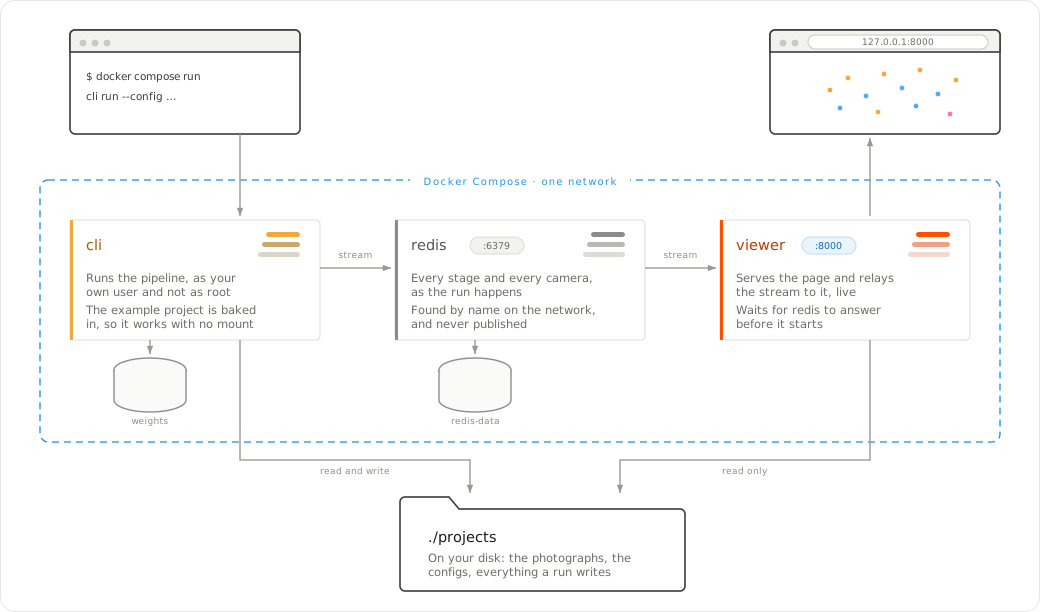
What each service is, what crosses the boundary and what does not. ./projects
is one directory on your disk mounted into two containers, writable for the
pipeline and read-only for the viewer; the named volumes belong to Docker. Only
the viewer publishes a port, and only on the loopback address.
Published images
Nothing is published yet: the images go out when a release is published, and there has been no release. They will land in two registries at once — GitHub's, which needs no account of ours, and Docker Hub, which is where people look:
# Coming, once there is a release
# docker compose pull                         # both, by the names compose already uses
# docker pull ghcr.io/dpadillaor/sfmkit:cpu   # docker pull padidavid/sfmkit:cpu
# docker pull ghcr.io/dpadillaor/sfmview      # docker pull padidavid/sfmview
GitHub's registry is the one compose names; Docker Hub carries the same
images under padidavid/, for anyone whose network is happier with it.
Until then, the commands below build the same images locally, under those same names.
First, your user
The CLI container writes runs into a mounted directory, so it runs as you
rather than as root. Compose reads that from .env:
Build
make image                    # ghcr.io/dpadillaor/sfmkit:cpu
make image DEVICE=gpu         # ghcr.io/dpadillaor/sfmkit:gpu
docker compose build viewer   # ghcr.io/dpadillaor/sfmview
The images are named as they are published, so once there is a release the same compose file pulls them instead:
make image passes the current commit in as a build argument, and every run
made inside the image records it in its manifest: a result can be traced to the
code that produced it.
Both images run as an ordinary user, uid 1000, rather than as root — compose overrides that with your own uid so the runs it writes belong to you.
Run the pipeline
docker compose run --rm cli run --config projects/valencia/configs/cpu.yaml
docker compose run --rm cli-gpu run --config projects/valencia/configs/gpu-dense.yaml
cli is the entry point sfmkit, so everything after the service name is the
command line you would type locally. It mounts ./projects — one directory,
because a project holds its photographs, its configs and its runs — writable, so
the output lands in the repository as usual. That a run writes nothing but its
own directory is checked in CI rather than promised by the mount.
Each image ships the frozen run it can reproduce: sfmkit:cpu carries
projects/valencia/runs/reference-cpu, sfmkit:gpu carries
projects/valencia/runs/reference-gpu-dense with its
dense cloud. You can open the viewer on them before running anything yourself.
To re-run one rather than look at it, copy it to the name its config writes —
cpu.yaml writes cpu, and the frozen one is called reference-cpu precisely
so that a run cannot land on top of it:
cp -r projects/valencia/runs/reference-cpu projects/valencia/runs/cpu
docker compose run --rm cli verify --config projects/valencia/configs/cpu.yaml
A shell inside
The image's own environment with the same mounts a run gets: for reading a
traceback from inside, or for seeing what the container can actually reach. Its
prompt greets I have no name!, because the uid it runs as has no entry in the
image's /etc/passwd; nothing else is affected, since permissions go by number.
The feature weights
They are not baked into the image — SuperPoint's licence is for non-commercial
research and not ours to pass on — so the first match downloads them into
whatever is mounted at /opt/torch. Compose mounts a named volume by default,
so the download happens once:
To keep them somewhere of your own, point SFMKIT_WEIGHTS at a directory:
If they are missing and there is no network, the run stops with the two URLs and the paths to put them in, not a stack trace.
The viewer
docker compose up -d viewer         # http://127.0.0.1:8000
docker compose down                 # stops the viewer and its Redis
It mounts ./projects read-only — it never writes — and publishes port 8000
on the host's loopback only. From another machine, tunnel to it:
The image listens on 0.0.0.0 inside the container, because a published port
arrives on the container's network address rather than on its loopback, and it
carries its own healthcheck (sfmview-health, which asks /api/health from
inside; the image has Python, not curl). In a container set the port with
SFMVIEW_PORT rather than --port, so the healthcheck finds it too.
Watching a run as it is built
Live progress is a Redis stream that sfmkit writes and the viewer reads;
compose points both at its own redis service:
docker compose up -d viewer                                   # Redis, then the viewer
docker compose run --rm cli reconstruct --config projects/valencia/configs/cpu.yaml
Redis publishes no port: the containers find it by name on compose's network
and nothing outside reaches it. Only the viewer depends on it, so
docker compose run cli on its own starts no Redis and publishes nothing —
the run goes ahead either way. down removes Redis's container and the next
up starts an empty one, losing the streams; stop keeps them.
The services
| Service | Image | What it is |
|---|---|---|
cli |
ghcr.io/dpadillaor/sfmkit:cpu |
the pipeline, CPU only; entry point sfmkit |
cli-gpu |
ghcr.io/dpadillaor/sfmkit:gpu |
the same with CUDA PyTorch and COLMAP; gpus: all |
viewer |
ghcr.io/dpadillaor/sfmview |
the web viewer on port 8000 |
redis |
redis:7-alpine |
live progress, internal to the compose network |
Publishing an image
The CPU and viewer images are built and pushed by CI when a release is
published, to GHCR and to Docker Hub. GHCR needs nothing: GitHub lends the
workflow a credential for the duration. Docker Hub needs two repository
secrets, DOCKERHUB_USERNAME and DOCKERHUB_TOKEN; without them that half is
skipped rather than failed, so a fork with no Docker Hub account still gets a
green build and its images on GHCR.
Each image goes out with three tags: the version from the release, a moving one
(cpu for the pipeline, latest for the viewer) and the short commit, for
when a build has to be named exactly.
The GPU image is not built there: CUDA PyTorch and COLMAP's CUDA build do not fit a hosted runner's disk, so it is built where there is a GPU and published by hand:
make push refuses to publish from a working tree with uncommitted changes,
and stamps the commit into the image twice: as SFMKIT_GIT_COMMIT, which every
run manifest records, and as an OCI label. So a published image can always be
traced back, whoever built it:
docker inspect --format '{{index .Config.Labels "org.opencontainers.image.revision"}}' \
  ghcr.io/<owner>/sfmkit:gpu
GPU
The cli-gpu service asks for gpus: all, which needs NVIDIA's container
toolkit on the host:
# Debian/Ubuntu, from NVIDIA's repository
sudo apt-get install -y nvidia-container-toolkit
sudo nvidia-ctk runtime configure --runtime=docker
sudo systemctl restart docker
docker compose run --rm cli-gpu --help      # should print sfmkit's help
Without it the service fails to start; the CPU image does everything except
dense, which is GPU-only in COLMAP.